Oracle ERP Project Management 26A

Low

Feature Enablement
26A Update Features Covered:
1. Bill Groups to Combine Bill Transactions into Invoices
Quick Notes:



Address complex invoicing requirements by assigning bill transactions to a common Bill Group so they are included on the same invoice. The Bill Group attribute can either be populated programmatically as part of an integrated solution, where external business logic determines invoice grouping, or by manual assignment. This feature greatly increases the flexibility of how transactions are grouped into invoices, ensuring that customers are billed how they want to be billed, and reducing the need for complex and inefficient workarounds.
How does it work?
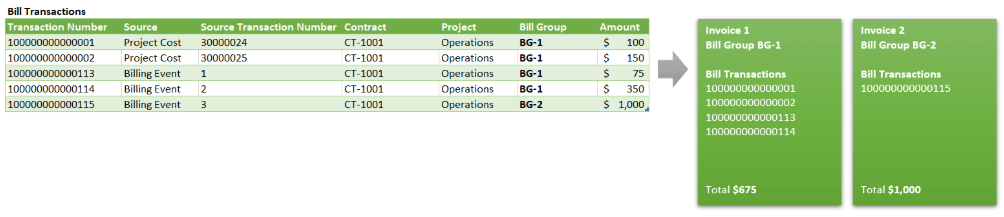
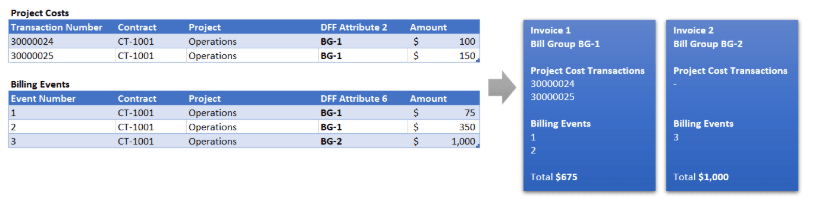
This feature delivers two ways to “tag” billable transactions with a common bill group identifier, so that they are invoiced together:
1. Manage the bill group attribute directly on bill transactions:
2. Manage the bill group attribute indirectly using nominated descriptive flexfield segments on project costs and/or billing events:
Steps to Enable:
As described in the worked examples above, this feature can be enabled by either:
- Opting in to the Bill Transaction Creation on Cost Import* feature and programmatically setting the bill group on bill transactions or,
- Configuring descriptive flexfield segments on project costs and/or billing events and nominating those segments to be used as a proxy for bill group.
*The Bill Transaction Creation on Cost Import feature can be found in Setup and Maintenance under the Project Financial Management offering. Use the Select Change Feature Opt In link above the Functional Areas table, and click the edit button in the Features column for the Project Billing row.
2. Project Change Request Lifecycle Management
Quick Notes:
Improve governance and reduce delays by routing change requests to the right approvers based on business-specific criteria such as priority or financial impact thresholds. Enable stakeholders to approve requests directly from emails to improve responsiveness in change management. Leverage business events triggered by status changes to automate downstream actions, such as consolidating requests into change orders or sending notifications upon approval, to reduce manual effort and ensure timely execution. Use the Change Management subject area in Oracle Transactional Business Intelligence to monitor and analyze the full change request lifecycle.
This feature extends the capabilities of the Project Change Requests and Consolidation into Change Orders functionality that was delivered in the 25D update. The set of enhancements include:
- Configurable Rules for Change Request Approvals
- Configurable Change Request Lifecycle
- Public Business Event Generation for Status Changes
- Modification Controls for Change Orders Linked to Change Requests
- Analytical Reporting of Change Requests
Steps to Enable:
To enable workflow and configure approval rules for change requests:
- Navigate to Setup and Maintenance –> Manage Project Statuses
- Select the Submitted status classification under Change Request Object.
- Enable workflow by selecting the checkbox under workflow attributes for Submitted status Classification. Set Status After Change Accepted and Status After Change Rejected as Approved and Rejected respectively.
- Navigate to Setup and Maintenance –> Manage User-Defined Rules for Project Management.
- Download the Project Change Request Approval rule template.
- Enter rules and conditions and upload, ensuring the upload is successful.
To disable updates of change orders created from change requests, disable status action control with the following steps:
- Navigate to Setup and Maintenance –> Manage Project Statuses
- Select Approved status classification under Change Request Impact Detail Object.
- For Approved status uncheck the Allow option.
To enable public events for change request status and priority changes:
- Use the ERP business events REST API to retrieve the business event and update the business event-enabled indicator. This indicator determines whether to initiate the business event or not.
ERP Business Events REST API Definition – /fscmRestApi/resources/11.13.18.05/erpBusinessEvents/
Note that the REST-Framework-Version is set to 9.
- Submit a GET request on the REST resource to retrieve the Business Event ID for the Business Event Code “ProjectChangeRequestStatusChanged”.
- Example: <hostname>/fscmRestApi/resources/11.13.18.05/erpBusinessEvents?q=BusinessEventCode=’ProjectChangeRequestStatusChanged’
- Submit a PATCH request on the REST resource to update the enabled indicator: <hostname>/fscmRestApi/resources/11.13.18.05/erpBusinessEvents/{{ErpBusinessEventId}
- Once you enable the feature, integration specialists can subscribe to the event in Oracle Integration Cloud to perform additional actions when the change request status or priority changes.