Oracle ERP Financials Cloud 26B
Medium

Feature Enablement
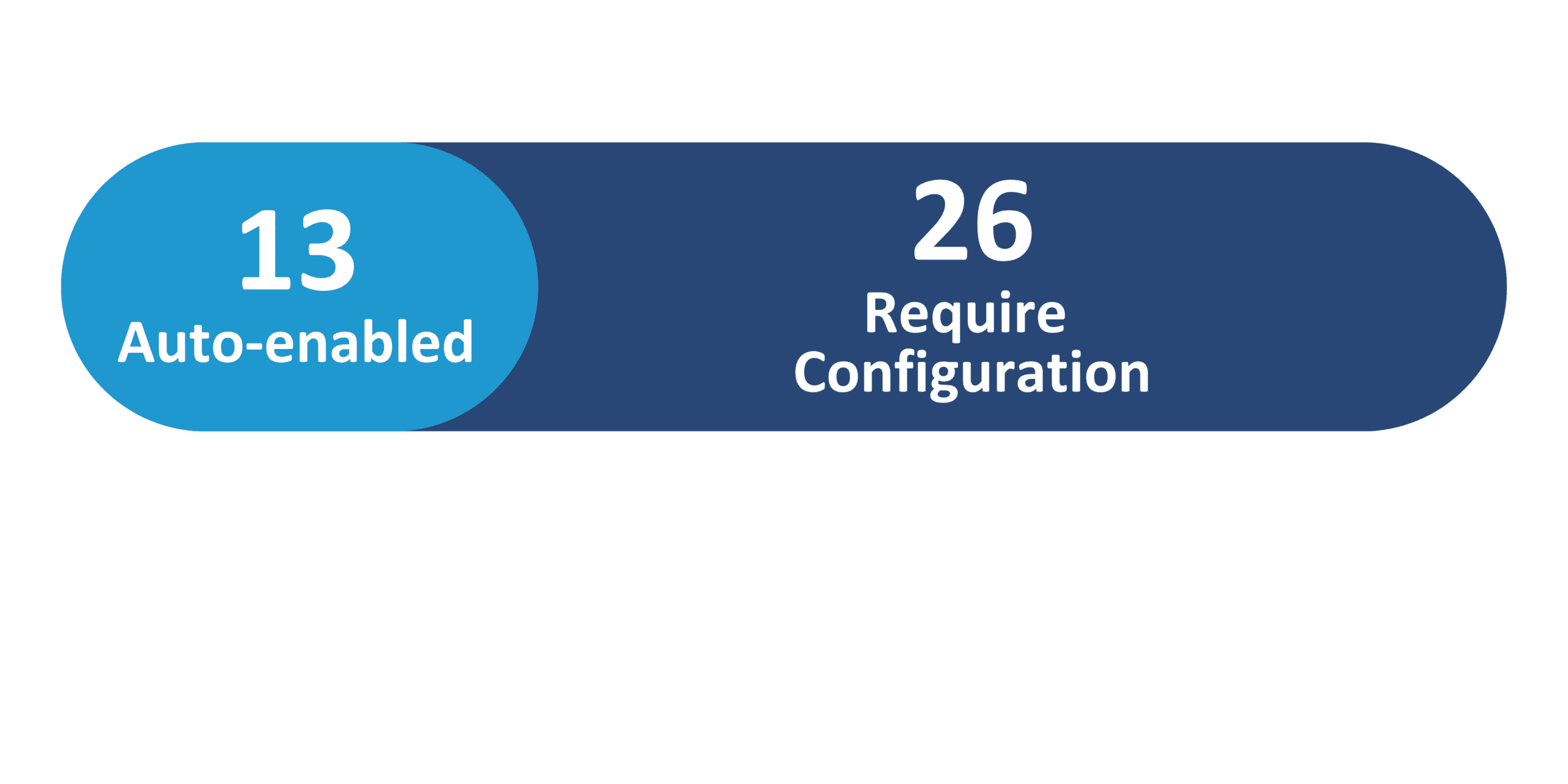
Redwood Features
Generative AI Features
26B Update Features Covered:
- Redwood Experience
- Generative AI
- Expense Policy Inquiry Enhancements Using Expenses Agent
- Ledger Agent for Agentic AI-Powered General Ledger Experience
- Payments Agent for Payment Options, Offers, and Execution
- Virtual Card Reconciliation with Multiple Settlements
- Turnkey Indirect Tax Automation with Thomson Reuters
- Additional Governance for Bank Account Transfers and Ad Hoc Payments
1. Redwood Experience
The Redwood enhancements introduced in the 26B release improve the experience for collaboration messaging and integration workflows within Oracle Financials. These updates introduce Redwood pages that allow administrators to configure collaboration messaging, define processing rules for B2B messages, and override inbound message definitions to support trading partner requirements. Additionally, organizations can receive quotes from Oracle Configure, Price, Quote (CPQ) and transform them into sales orders while simplifying supplier and customer collaboration messaging setup.
2. Generative AI
Oracle continues to expand its Generative AI capabilities in the 26B release with new AI-powered agents designed to automate and optimize financial processes. Enhancements to the Expenses Agent enable conversational expense completion, policy inquiries, and improved receipt capture and matching to simplify expense reporting. In addition, agents such as the Payments Agent, Payables Agent, and Ledger Agent help organizations automate invoice processing, evaluate payment options, and gain AI-driven insights into financial transactions and balances, improving efficiency and financial visibility across the enterprise.
3. Expense Policy Inquiry Enhancements Using Expenses Agent
Quick Notes:


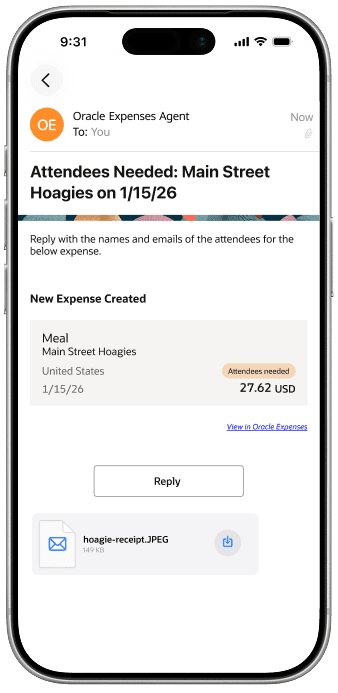
The agent answer questions about a company’s travel policies. Expense managers can upload the organization’s corporate travel and expenditure policies, allowing employees to use the agent to receive contextual answers to any questions related to these policies using the desktop or a mobile device.
This will help employees understand corporate policies before incurring business expenses and be aware of expense submission requirements.
Once the document is uploaded, the expense policy inquiry is available to users from the navigation bar using the Expenses Agent (messaging) icon.
Business benefits:
- Delivers tailored and immediate policy guidance, reducing non-compliant expense submissions and audit workload.
- Enhances the quality and relevance of information delivered.
- Streamlines access to policy information and reduces the need for manual searching or policy review, improving productivity and user satisfaction.
4. Ledger Agent for Agentic AI-Powered General Ledger Experience
Quick Notes:
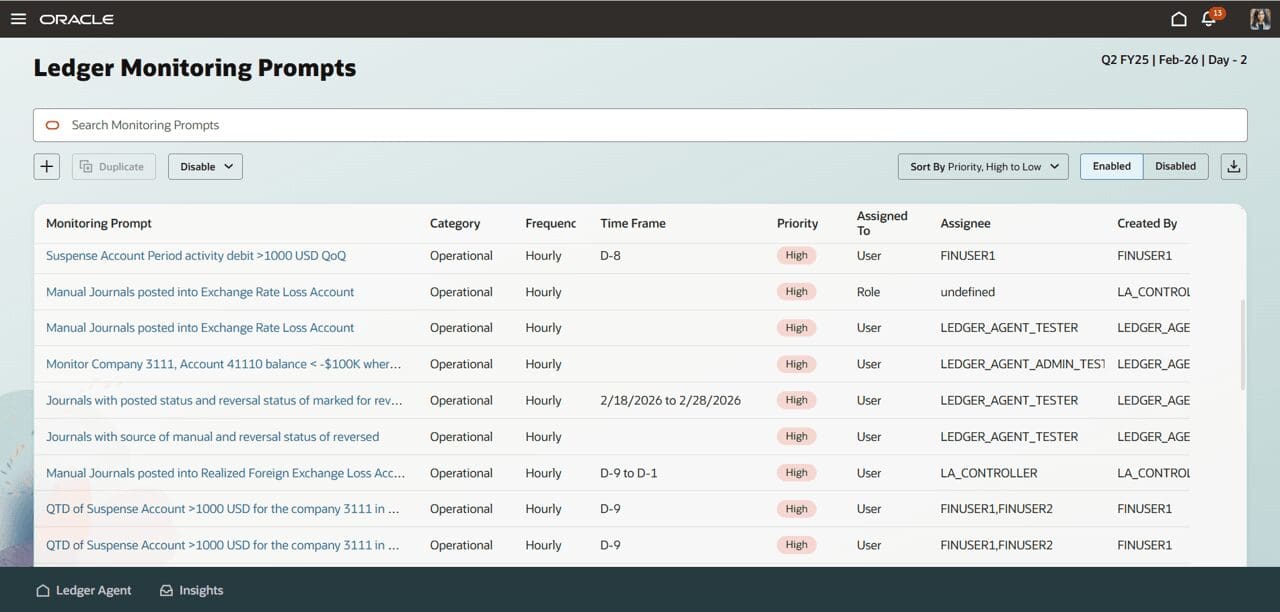
Ledger Agent provides clear AI-generated insights and explanations across Ledger and Subledger data, surfacing them to accountants only when intervention is required.
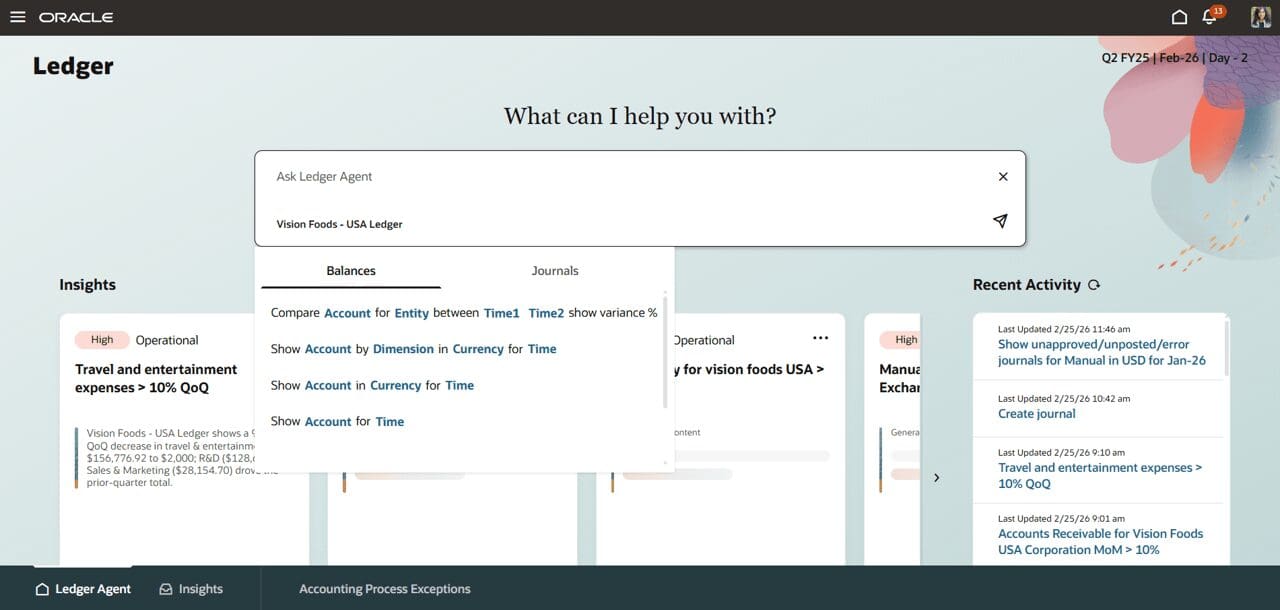
Accountants can ask natural language questions about balances, variances, insights, and process statuses, and receive precise responses powered by advanced financial entity recognition and dynamic query generation
Key Capabilities
Proactive Monitoring
- Use predefined monitoring prompts to surface operational process exceptions, such as accounting process exceptions or manual posted journals without approvals, at a frequency of your choosing, for example, Day – 5 or daily.
Insight Explanations
- Receive rich, contextual summaries for each generated insight to quickly understand operational and control issues from correlated data.
Account analysis and Balance Inquiry
- Use natural language balance inquiry – ask questions about financial data, including specific accounts, time periods, and comparative analyses,
Business benefits:
Ledger Agent modernizes day-to-day General Ledger activities by combining automation, proactive insights, and natural language interaction in a single, guided experience, giving Accounting and Finance teams more continuous visibility into balances, journals, and transactions.
5. Payments Agent for Payment Options, Offers, and Execution
Quick Notes:
The Oracle Payments Agent transforms the payments process from a focus on just paying suppliers to using the outstanding payment information to evaluate payment options and benefits in light of working capital goals. The agent works with users to manage and optimize payment processing using conversational and insights-driven experiences.
The Payments Agent further supports users during execution by guiding the scheduling and monitoring of payment process requests and surfacing status, exceptions, and follow-up actions to help ensure payments are completed as intended.
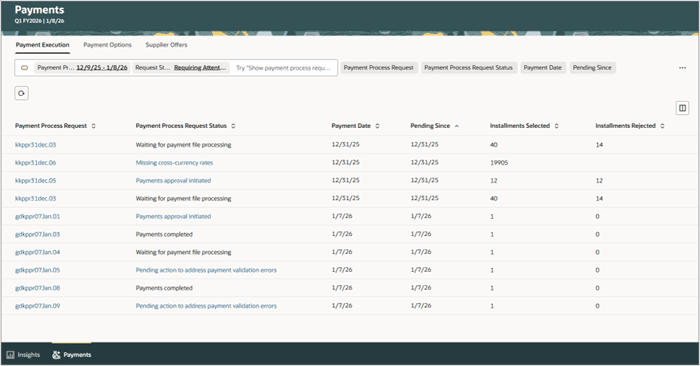
The Payments Agent interacts with users using three overview pages: Payment Execution, Payment Options, and Supplier Offers.
Payment Execution Assistant
The Payment Execution Assistant supports the scheduling, submission, and monitoring of payment processing. The assistant guides users through the submission of payment process requests, shows the status of payments and payment files, and highlights exceptions or conditions.
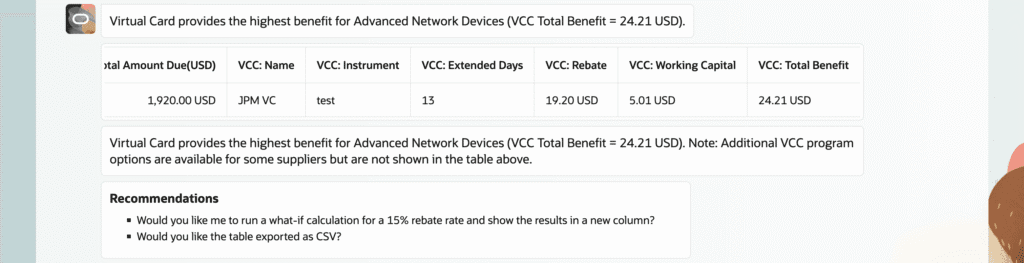
Payment Options Assistant
The Payment Options Assistant helps users review suppliers’ upcoming payable installments and to identify which are due in the coming weeks. Users can ask the assistant to compare the financial benefits of different payment programs.
Supplier Offers Assistant
The Supplier Offers Assistant guides users through the creation, review, and communication of dynamic discount offers to suppliers and tracks supplier responses throughout the offer lifecycle.
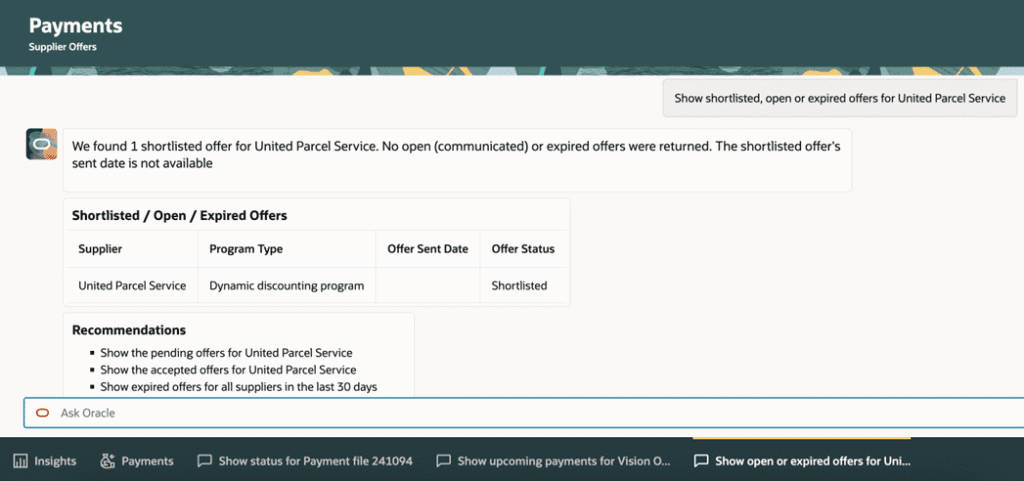
Business benefits:
- Centralized Visibility: A single, guided experience to monitor payment insights, evaluating optimization opportunities, and managing execution and exceptions.
- Operational Efficiency: Uses insights view and conversational assistance to identify issues early and reduce manual investigation.
- Optimized Cash Flow: Enhances liquidity and surplus cash utilization through integrated programs like virtual cards and dynamic discounting.
- Financial Gain: Generates incremental financial benefits via early-payment discounts and virtual card rebate revenue.
- Strategic Agility: Streamlines the payment lifecycle to improve market responsiveness and strengthen supplier relationships.
6. Virtual Card Reconciliation with Multiple Settlements
Quick Notes:
This feature ensures accurate reconciliation by matching all related transactions to the corresponding virtual card, and recording the card statement accurately.
This feature is invoked when your organization receives card statement lines for virtual card supplier payments. It supports scenarios where a single virtual card payment is settled in more than one transaction, including settlements that arrive across billing cycles, and helps ensure that all settlement activity is evaluated together so the card statement is recorded accurately.
Business benefits:
- Seamless completion of multiple settlements for the same virtual card
- Accurate recording of card statements with multiple settlements
7. Turnkey Indirect Tax Automation with Thomson Reuters
Quick Notes:
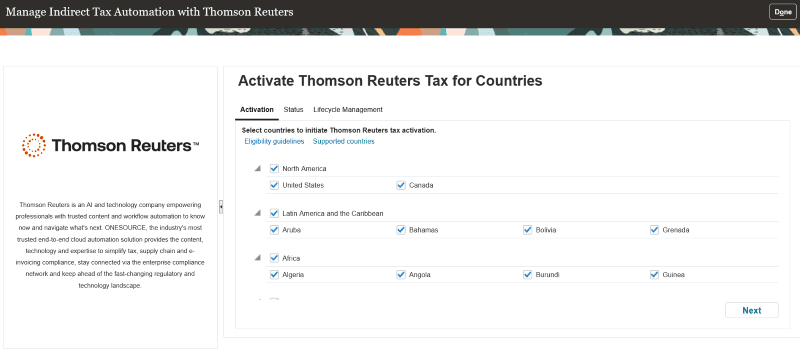
Activate Thomson Reuters as a tax partner directly from Oracle Tax. The embedded and preconfigured native integration with Thomson Reuters enables indirect tax calculation, signature-ready returns, and compliance reporting, offering a seamless and efficient setup process for global tax requirements.
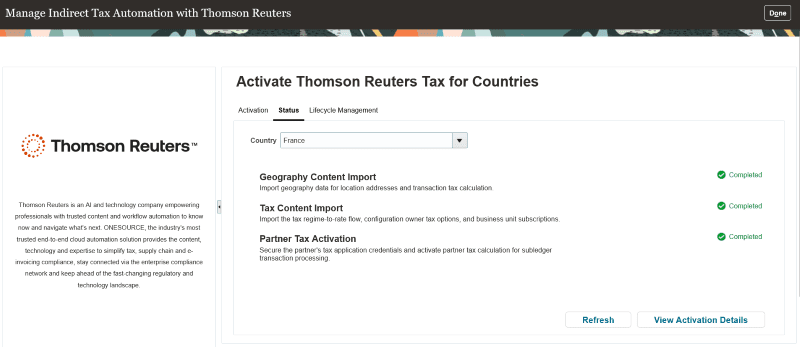
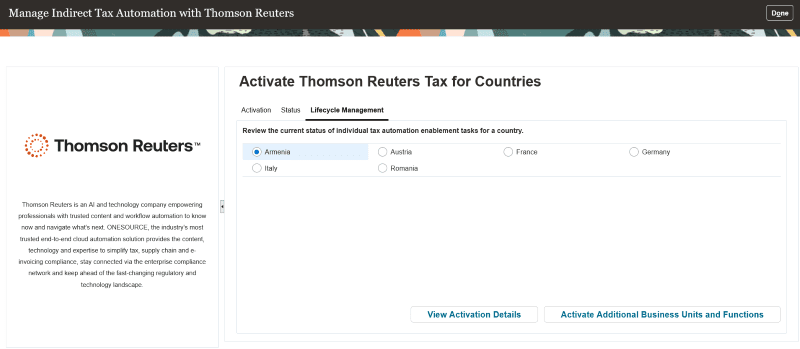
The page has three tabs:
- Activation
This tab displays all eligible countries supported by Thomson Reuters for which business units and legal entities are configured.
- Status
This tab displays the enablement status for indirect tax activation by country. You have the option to select a country to view its status.
- Lifecycle Management
This tab displays the activation details for a country. Additionally, you can add new business units and functions to an existing country activation.
Business benefits:
- Streamlines Thomson Reuters tax activation by allowing users to activate the Tax Partner within a country for selected business units and defined functional scope (applications).
- Supports ongoing expansion by enabling additional business units and new business flows after initial country activation.
8. Additional Governance for Bank Account Transfers and Ad Hoc Payments
Quick Notes:

These enhancements improve transaction transparency, ensure data accuracy, and provide better documentation for compliance and audit purposes. Users can Capture payment information during bank account transfers and ad hoc payments and initiate transfers in the original currency of the source bank account.
Business benefits:
- Support for capturing payment attributes in bank account transfer and ad hoc payment: The payment attributes like service level, delivery channel, payment reason can be added while creating Bank Account Transfers and Ad Hoc Payments. These attributes are used to process electronic payment files more accurately, improving straight-through processing, reducing downstream handling errors, and increasing transaction transparency.
- Initiating Bank Account Transfers in From Bank Account Currency: This enhancement allows transfers to be processed in the original currency of the source bank account, reducing the risk of conversion errors and simplifying reconciliation.
- Support Memo Field in Manage BAT: Offers users a way to document additional transfer details directly in the system, enhancing internal communication and providing richer context for each transaction. This supports improved auditability and easier retrieval of transaction history.