Oracle HCM Absence Management Cloud 26B
Medium

Feature Enablement

Redwood Features
26B Update Features Covered:
- Redwood Experience
- Generative AI
- Additional Columns in the Absence Redwood Experience
- Display of Partial Day Absences on Worker’s Calendar
- Event Processing for Front-loaded Accrual Plans
- Default Workday Definitions from Work Patterns
1. Redwood Experience
The 26B release expands the Redwood user experience for Absence Management, introducing a modern interface for absence entry, improved navigation, and better visualization of leave balances and planning.
2. Generative AI
Oracle is gradually introducing AI capabilities across HCM modules. For Absence Management, AI insights help HR and managers analyze leave trends, identify workforce risks, and make better planning decisions.
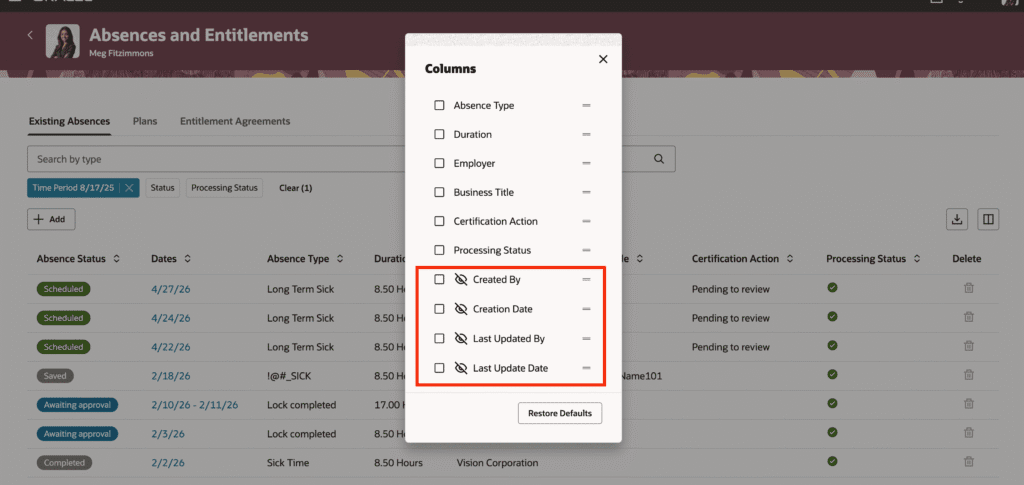
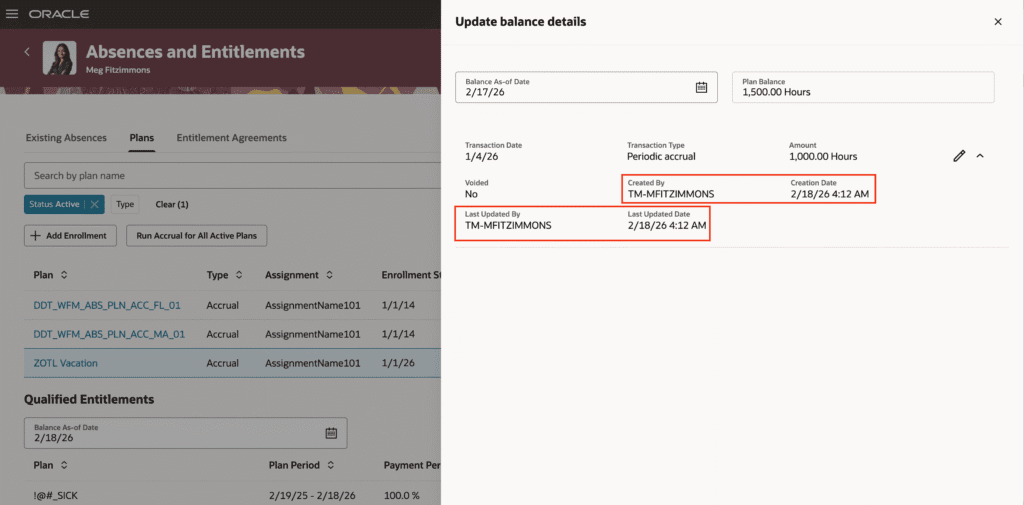
3. Additional Columns in the Absence Redwood Experience
Quick Notes:


The Absences and Entitlements page and the Absence Planning page now have 4 additional columns available. You can now display four additional columns on the Absences and Entitlements page and Absence Planning page.
- Creation date
- Created by
- Last update date
- Updated by
Steps to Enable:
Set ORA_ANC_ADMIN_ABSENCE_VBCS_UI_ENABLED to Y
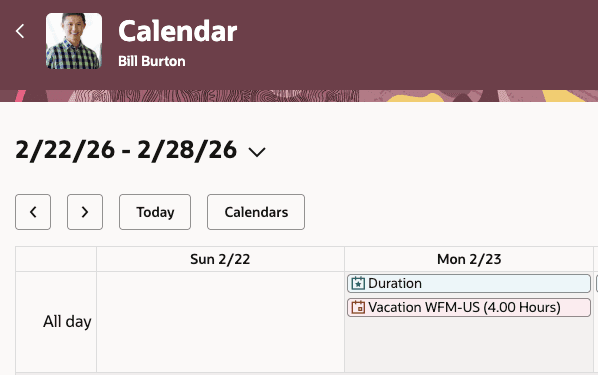
4. Display of Partial Day Absences on Worker’s Calendar
Quick Notes:
The Redwood Calendar now displays the absence duration in the event title for partial day absences. For elapsed schedules and absences with days UOM, the duration is shown in parentheses after the absence type name. When a worker enters a partial day absence, you can now view the duration of it on the Redwood Calendar.
5. Event Processing for Front-loaded Accrual Plans
Quick Notes:
Front-loaded accrual plans post an accrual only in the first accrual period of the plan year. But now, you can associate HCM Events with a front-loaded accrual plan to automatically recalculate accruals whenever there’s an HR assignment change.
Here’s an example. Let’s assume the following accrual matrix is configured for a front-loaded accrual plan:
| Priority | Condition | Accrual in hours |
|---|---|---|
| 0 | Grade <= 3 | 120 |
| 20 | Grade >= 4 | 160 |
The worker’s grade changes from 3 to 4 on May 1. Here’s how the accrual is calculated:
- 120 * (120/365) = 39.45 (worker is in Grade 3 for 120 days of the year)
- 160 * (245/365) = 107.40 (worker is in Grade 4 for 245 days of the year)
- (39.45 + 107.40) – 120 = 26.85
A positive balance adjustment is posted with an effective date of May 1 for 26.85 hours.
6. Default Workday Definitions from Work Patterns
Quick Notes:
Absence Management and Time and Labor use workday definitions to derive the payment date for shifts that cross the day divide (usually midnight). You can now associate workday definitions with the worker’s work pattern instead of their primary assignment to better align their tasks with their user roles. When retrieving a worker’s workday definition, the system first looks for it on the primary assignment. If it isn’t found on the primary assignment, the system searches for one on the work pattern.
You now have the option to associate a worker’s workday definitions with the worker’s work pattern instead of their primary assignment.