Oracle HCM Benefits Cloud 26B

Low

Feature Enablement
Redwood Features
Generative AI Features
26B Update Features Covered:
- Redwood Experience
- Generative AI
- Life Event Name Displayed in the Redwood Benefits Enrollment Guided Flow
- Benefits Certification Agent
- Court Order Intake Assistant
1. Redwood Experience
Oracle continues to enhance Redwood Benefits pages in the 26B release, focusing on improving usability and providing administrators with greater control over how benefits information is displayed. Enhancements include displaying the life event name within the Redwood Benefits Enrollment guided flow, expanded translation editor support for multi-language capabilities, and the ability to define display sequences for benefit programs and plans across Redwood self-service pages and reports with greater flexibility.
2. Generative AI
As part of expansion of Generative AI features within Oracle Fusion applications, the 26B release introduces new intelligent features to simplify complex benefits administration processes. The Benefits Certification Agent automates the review of employee-submitted certification documents for Proof of External Coverage. Additionally, the Court Order Intake Assistant reads court order documents, extracts key details such as order information and populates your existing benefits page for review prior to saving which helps to manage court-ordered coverage.
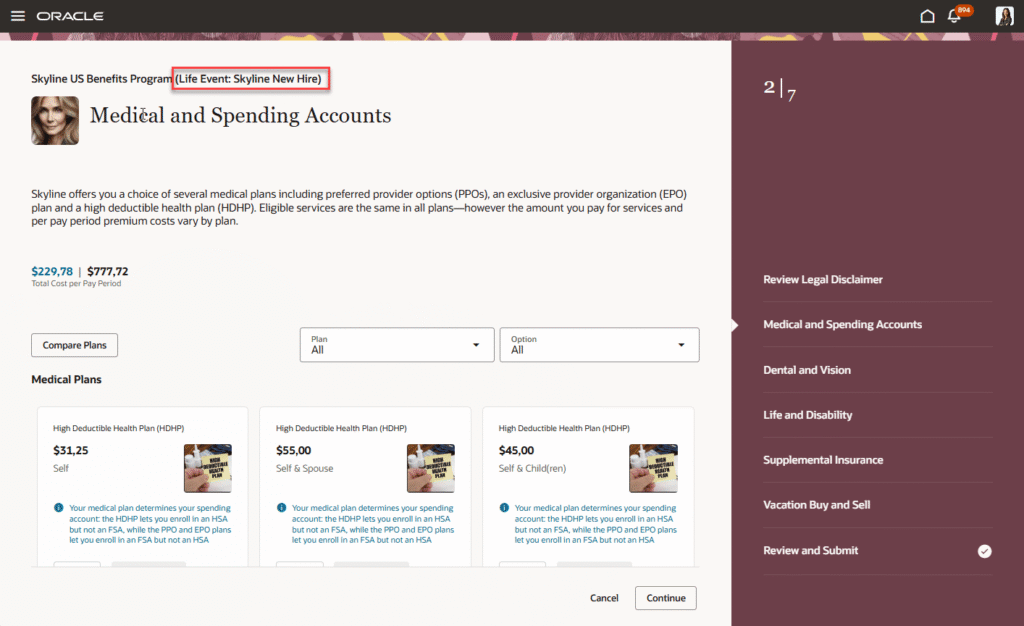
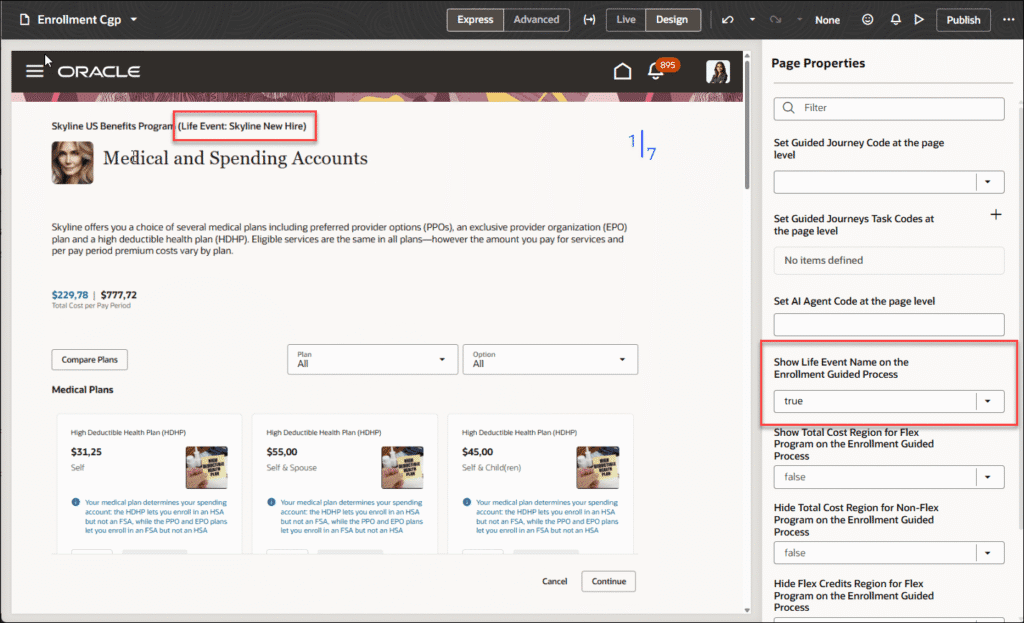
3. Life Event Name Displayed in the Redwood Benefits Enrollment Guided Flow
Quick Notes:


This feature ensures that users can clearly see which life event is associated with their current benefits enrollment. It ensures contextual guidance by displaying the relevant life event name during the enrollment process, ensuring employees understand the reason for their benefit changes, reducing confusion and supporting more accurate selections throughout the enrollment process
4. Benefits Certification Agent
Quick Notes:
The Benefits Certification Agent is an AI-powered digital worker that automates the review of employee submitted certification documents for Proof of External Coverage.
Here’s how this agent works:
- Evaluates uploaded certification documents using predefined weighted criteria.
- Extracts relevant data.
- Validates the data against pending actions and calculates a confidence-based match score.
- Approves or rejects certifications based on the evaluation.
The agent reduces manual intervention while ensuring consistent, compliant decision making.
5. Court Order Intake Assistant
Quick Notes:
This agent assists administrators in processing court orders by guiding reviews of order details entered in the system, confirming employee and dependent records, and applying required dependent coverage to designated plans or plan types.
Here’s how this agent works:
- Record court orders.
- Validate required legal elements.
- Associate affected dependents.
Previously, administrators had to manually enter data from legal documents. The agent automates this process to reduce errors and processing time while ensuring administrators remain in control of the final record.