Oracle HCM Payroll Cloud 26D

Medium

Feature Enablement
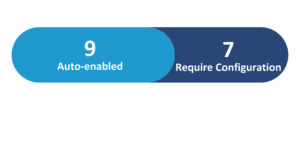
Redwood Features
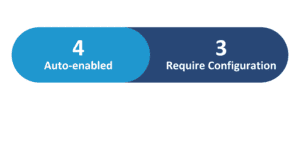
26D Update Features Covered:
- Redwood Experience
- SECURE 2.0 Act Section 603 Catch-Up Eligibility Update
- Tax Calculation Statement Page: Federal Income Tax
- Redwood Experience for Balance Adjustment
- Retropay Enhancements for Multiple Payroll Runs in a Period
1. Redwood Experience
Oracle Cloud Payroll Release 26D delivers significant Redwood experience enhancements designed to streamline payroll administration. Organizations can now manage Legal Entity and Tax Reporting Unit organization calculation cards within the Redwood interface. Additionally, the updated Redwood experience for balance adjustments enables administrators to execute multi-balance adjustments in a single transaction, seamlessly review before-and-after values, and assign specific costing rules, elevating overall user efficiency. Additionally with this release we see Payroll Setup, Fast Formula and Payroll Component pages available with redwood experience.
2. SECURE 2.0 Act Section 603 Catch-Up Eligibility Update
Quick Notes:


The Start-of-Year process now includes automated support for SECURE 2.0 Act Section 603 catch-up eligibility updates. Organizations no longer need to manually update the pretax age catch-up eligibility field on employee Reporting Information cards, as the process automatically derives a single eligibility outcome per payroll relationship.
Administrators can configure high-earner evaluation levels at the payroll statutory unit, tax reporting unit, or tax group level on the organization calculation card. Running the Start-of-Year process in draft mode allows payroll teams to verify high-earner catch-up eligibility and review output warning messages prior to committing final updates, significantly reducing administrative overhead and supporting retroactive corrections.
Business benefits:
- Reduces manual maintenance of employee reporting information cards for catch-up eligibility.
- Automates annual high-earner evaluation across PSUs, TRUs, or tax groups.
- Enhances auditability with draft review modes and output warning log messages.
3. Tax Calculation Statement Page: Federal Income Tax
Quick Notes:
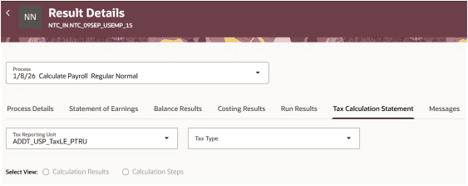
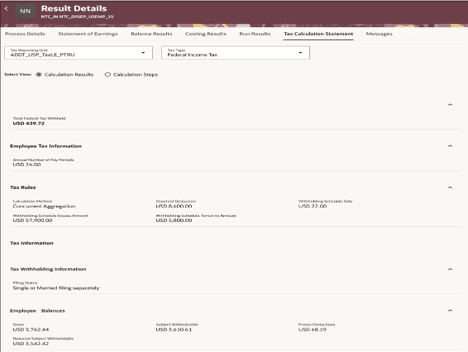
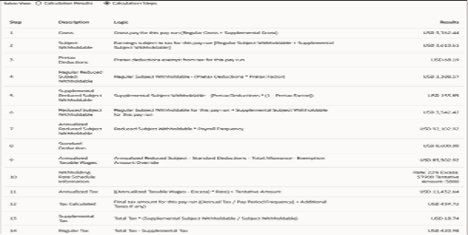
A new Tax Calculation Statement tab on the Person Results page gives payroll administrators detailed visibility into run-specific online tax calculations for individual employees. Users can inspect tax withheld, liability amounts, tax rules, tax withholding settings, and employee balances organized by process, tax reporting unit, and tax type. Furthermore, the calculation steps view details the complete step-by-step mathematical sequence, outlining expressions, intermediate values, and final outputs for each line item.
This level of granular visibility streamlines payroll auditing, simplifies verification of complex tax calculations, and empowers organizations to resolve tax withholding inquiries faster and with full operational clarity.
Business benefits:
- Delivers granular insight into run-specific federal tax calculation results and steps.
- Exposes detailed mathematical sequences, intermediate values, and applied tax rules.
- Accelerates troubleshooting and auditing of employee tax withholding inquiries.
4. Redwood Experience for Balance Adjustment
Quick Notes:

The Adjust Individual Balances task has been redesigned in the Redwood user experience, allowing organizations to correct employee payroll balances as of a chosen date with expanded functionality. Payroll administrators can initiate adjustments by balance or element and manage multiple balance adjustments within a single transaction. The interface displays side-by-side comparison of before and after values across supported period types, lets users assign individual costing details per adjustment, and uniform payment balance settings.
Direct navigation between Redwood balance results, adjustment pages, and result details ensures complete transparency while significantly reducing administrative time spent on routine balance corrections.
Business benefits:
- Enables processing and costing of multiple balance adjustments in one submission.
- Provides side-by-side comparison of before and after values for impacted balances.
- Simplifies navigation between balance results, adjustments, and detailed execution logs.
5. Retropay Enhancements for Multiple Payroll Runs in a Period
Quick Notes:
Retropay processing has been enhanced to handle scenarios where workers have multiple payroll runs within a single payroll period, such as a bonus run followed by a regular run. The enhancement prevents duplicate retroactive entries and unnecessary offset adjustments by restricting recalculations exclusively to entries present in the original payroll run.
Recurring elements configured to process once per period exclude newly loaded entries that were submitted after the original calculation occurred. This ensures retroactive payroll calculations remain accurate, eliminates redundant adjustments across multiple processing cycles within the same period, and significantly strengthens auditability for complex retro processing workflows.
Business benefits:
- Prevents duplicate retroactive entries and unnecessary offset adjustments across multiple runs.
- Restricts retroactive recalculation specifically to entries included in the original run.
- Improves retro accuracy and audit clarity for recurring once-per-period payroll elements.