Oracle HCM Recruiting Cloud 26D
Low

Feature Enablement
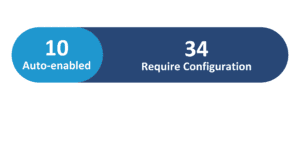
Redwood Features
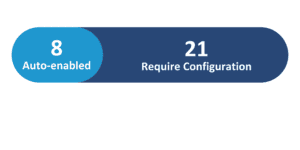
Generative AI Features
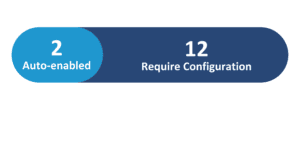
26D Update Features Covered:
- Redwood Experience
- Generative AI
- Create Data-Driven Salary Recommendation and Offer Creation Assistance using Job Applicant Advisor
- Use Candidate Sourcing Workspace to Create Candidate Pipelines Before a Requisition Opens
- Access Job Offers from Candidate Experience and Opportunity Marketplace
- Identify Inappropriate Content in Recruiting Messages
- Let Candidates Apply for Jobs Conversationally with Career Coach
- Help Candidates Understand Job Offers with Career Coach
- Automate Candidate Referral Creation
- Send Attachments with Email Notification Templates
1. Redwood Experience
Oracle Cloud Recruiting 26D enhances the Redwood user experience by streamlining high-volume talent acquisition workflows and modernizing recruiter and candidate interactions. Organizations benefit from redesigned workspaces, conversational candidate touchpoints, and intuitive job offer management. These Redwood advancements empower talent acquisition teams to build talent pipelines faster, make data-driven compensation decisions, and deliver seamless, responsive self- service experiences for candidates throughout the recruitment lifecycle.
2. Generative AI
Oracle continues to expand generative AI and agentic capabilities within Oracle Cloud Recruiting in release 26D. Strategic AI agents assist hiring teams with data-driven salary recommendations, proactive pipeline sourcing, and automated offer creation workflows. Additionally, conversational AI capabilities empower job seekers through interactive application processes and personalized offer queries, driving efficiency for recruiting teams while optimizing candidate engagement across all digital touchpoints.
3. Create Data-Driven Salary Recommendation and Offer Creation Assistance using Job
Applicant Advisor
Quick Notes:


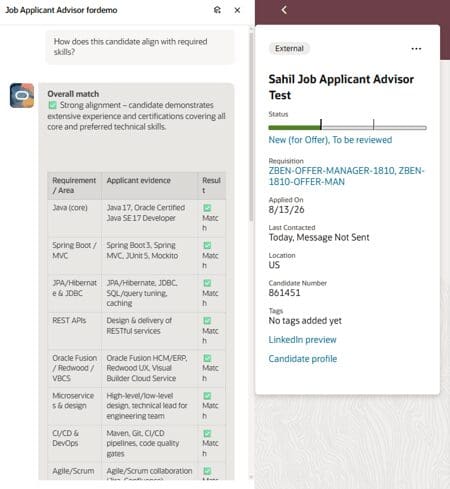
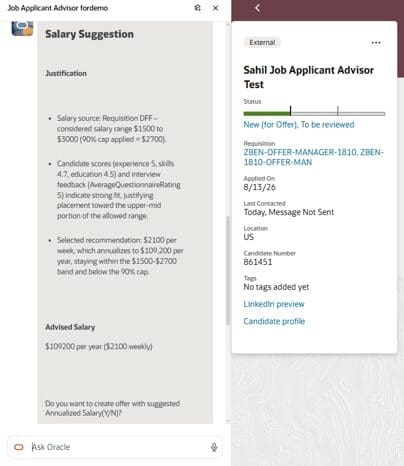
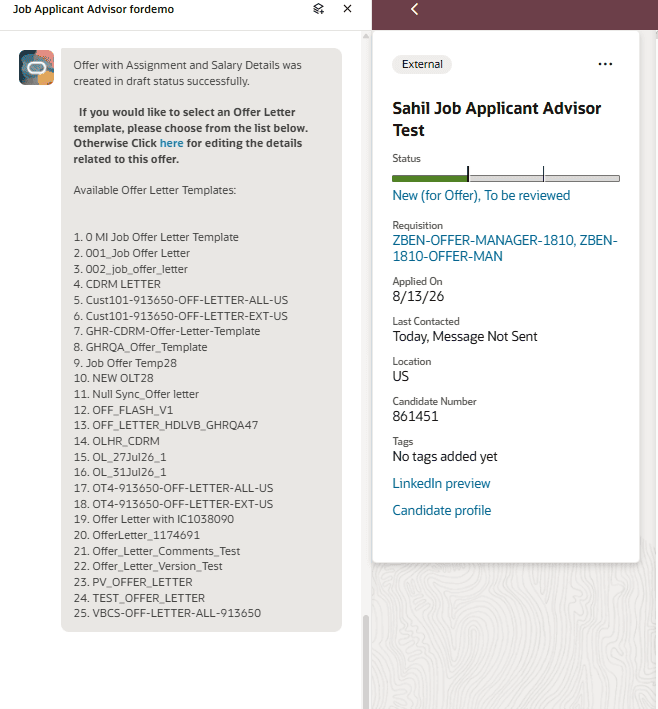
The Compensation Recommendation and Job Offer Creation Advisor provides hiring managers and recruiters with intelligent, data-driven compensation guidance during the offer stage. Operating as an AI agent within the Redwood platform, this feature evaluates candidate fitment scores, internal peer salary benchmarks, and approved requisition salary ranges to calculate optimal compensation proposals.
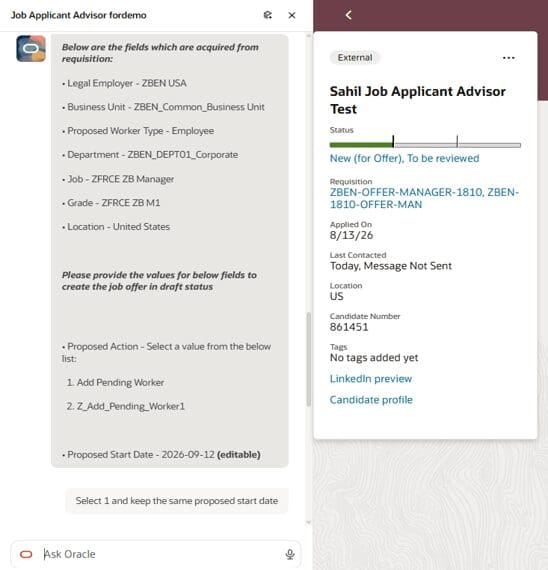
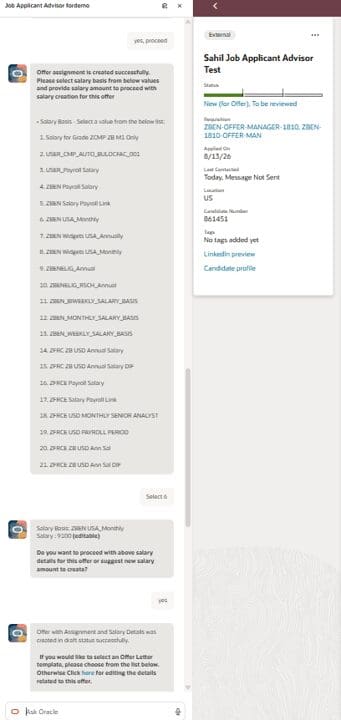
Users interact with the conversational advisor to generate competitive offer recommendations tailored to specific requisitions and organizational parameters. By automating salary data consolidation and guiding teams through draft offer creation, organizations streamline compensation approval workflows, reduce offer preparation times, and maintain equitable, benchmarked pay structures across hiring activities.
Business benefits:
- Generates data-driven salary proposals using requisition ranges, peer salaries, and candidate fitment scores.
- Streamlines offer creation through an interactive, conversational AI agent experience.
- Promotes equitable compensation practices while accelerating offer generation timelines.
4. Use Candidate Sourcing Workspace to Create Candidate Pipelines Before a Requisition Opens
Quick Notes:
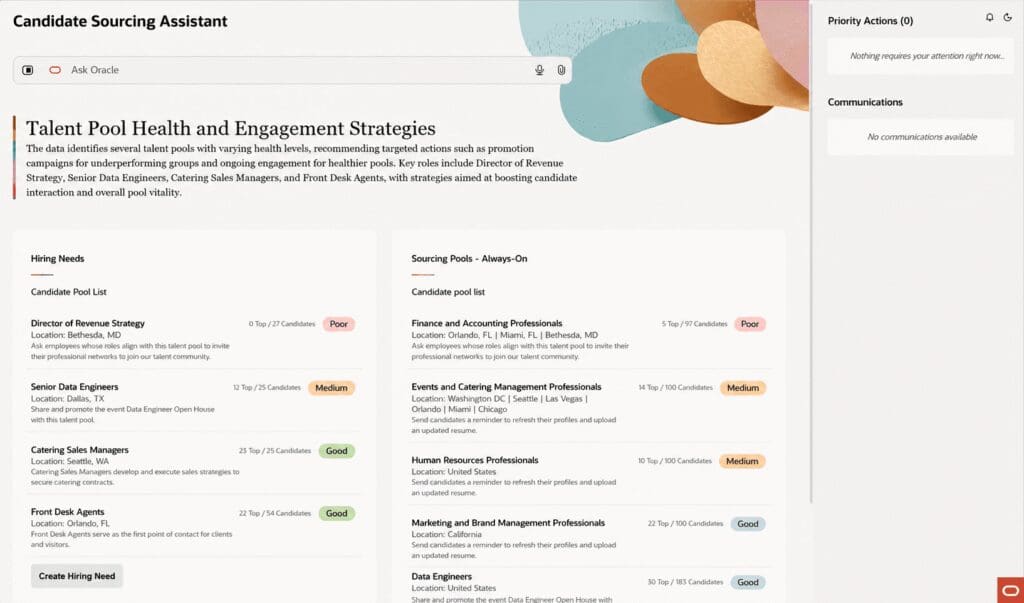
The Candidate Sourcing Workspace enables talent acquisition teams to proactively build and manage candidate pipelines prior to official requisition creation. Leveraging AI agent capabilities, the workspace analyzes historical hiring data and early business signals to establish always-on candidate pools. Recruiters review top candidate matches accompanied by AI-generated fit summaries that highlight strengths and potential alignment gaps.
The workspace provides automated recommended actions, including candidate follow-ups, profile-refresh campaigns, event promotions, and shortlisting. When formal requisitions open, talent teams can instantly transfer qualified prospects into active pipelines, significantly reducing time-to-fill and maintaining continuous talent engagement across critical roles.
Business benefits:
- Establishes automated candidate pools driven by hiring history and early organizational demands.
- Surfaces AI-generated candidate summaries detailing key qualifications and alignment areas.
- Accelerates hiring cycles by transitioning shortlisted candidates immediately when requisitions open.
5. Access Job Offers from Candidate Experience and Opportunity Marketplace
Quick Notes:
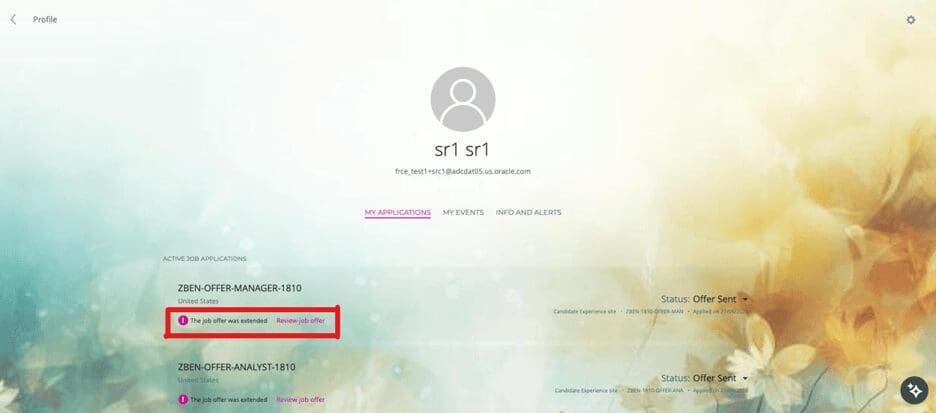
External candidates on a career site and internal candidates in Opportunity Marketplace can now access extended job offers directly from their candidate-facing application, rather than relying solely on offer-email notifications. The offer page surfaces offer documents and response actions in one place.
Candidates can view offer letters as the offer progresses through later statuses, find offer-related applications more easily through prioritized listings and a prominent “Review job offer” link, accept or decline while the offer is active, and view signed documents after accepting.
Business benefits:
- Gives candidates a more transparent, self-service way to manage offers
- Reduces dependency on offer-email notifications being seen or found
- Surfaces offer-related applications more prominently for candidates
- Works immediately, with no configuration required
6. Identify Inappropriate Content in Recruiting Messages
Quick Notes:
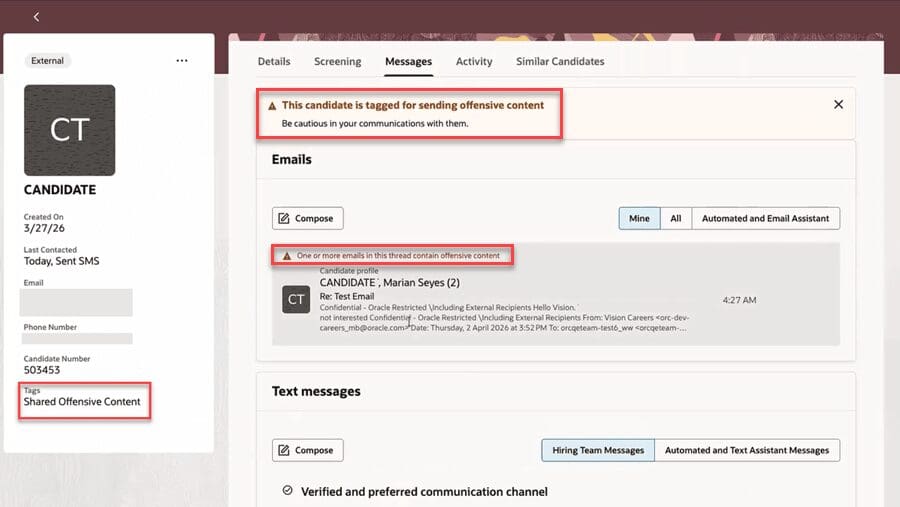
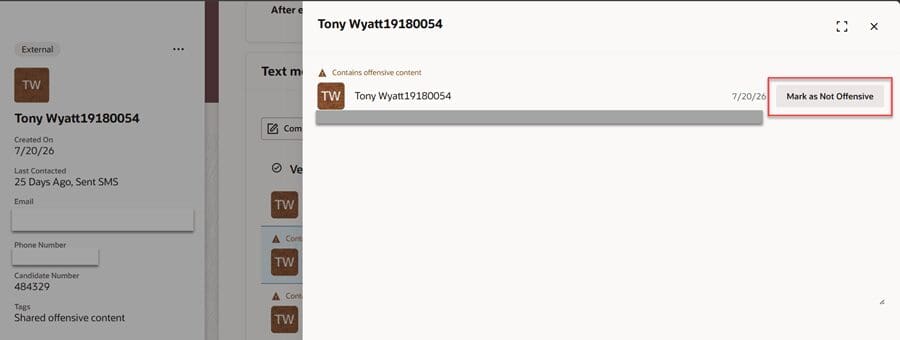
Recruiting messaging now uses the Recruiting Inbox Screening Agent to scan inbound candidate emails, SMS, and WhatsApp messages for abusive, threatening, harassing, or otherwise inappropriate content. The agent uses intent-based detection to distinguish genuinely harmful content from ordinary criticism or frustration, and masks flagged text for users who don’t hold the privilege to view it.
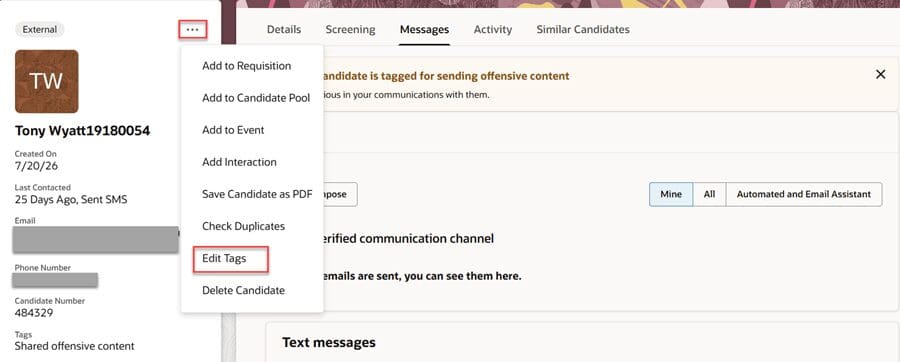
Candidates whose messages are flagged are tagged with an administrator-defined label, and affected conversations show clear indicators and banners. Inappropriate messages are also blocked from continuing into the Career Coach Agent or Inbox Response Agent, and the hiring team is notified only when messages are clean — reducing the recruiting team’s exposure to harmful communications.
Business benefits:
- Protects recruiters and hiring teams from harmful candidate communications
- Preserves controlled, privilege-based access to flagged content for authorized users
- Stops offensive messages from feeding into downstream AI agents or hiring-team notifications
- Gives administrators visibility through candidate tagging and message-level indicators
7. Let Candidates Apply for Jobs Conversationally with Career Coach
Quick Notes:
Let Candidates Apply for Jobs Conversationally with Career Coach introduces an interactive application workflow powered by conversational AI. External candidates interacting with Career Coach on career sites or via messaging channels such as SMS and WhatsApp can initiate and complete job applications directly within the conversational interface. The AI agent guides candidates through essential application steps, capturing contact details and required prescreening answers in a simplified text format without navigating traditional complex application forms.
This modernized application path lowers submission friction, increases candidate conversion rates, and enables job seekers to engage conveniently through preferred mobile channels.
Business benefits:
- Simplifies the application experience through conversational interactions on web and messaging channels.
- Captures essential candidate information and prescreening responses directly within SMS or WhatsApp.
- Improves candidate conversion rates by reducing application completion effort and friction.
8. Help Candidates Understand Job Offers with Career Coach
Quick Notes:
Help Candidates Understand Job Offers with Career Coach provides authenticated candidates with real-time, personalized assistance during job offer evaluations. When candidates navigate to their offer page, Career Coach activates in context, analyzing offer letters and attached documentation to deliver instant, accurate responses to questions regarding compensation, benefits, start dates, and role terms.
Grounded strictly in verified document data, the AI agent clarifies complex offer details without requiring manual recruiter intervention. This automated guidance improves candidate transparency, accelerates offer decision-making, reduces recruiter administrative burdens, and provides job seekers with modern, interactive support during critical hiring decisions.
Business benefits:
- Delivers immediate, context-aware answers to candidate questions regarding offer terms and benefits.
- Reduces recruiter workload by automating responses to standard pre-employment inquiries.
- Enhances candidate decision confidence through transparent, document-grounded AI assistance.
9. Automate Candidate Referral Creation
Quick Notes:
The Recruiting Email Referral Agent automates referral intake for Opportunity Marketplace — employees simply email a resume to a configured inbox to submit a referral. The agent verifies the sender is an employee, confirms a valid resume attachment, then hands off to the Recruiting Referral Creation Agent, which parses the resume, resolves or creates a candidate profile, and blocks referrals for internal candidates.
The agent then matches the candidate against open Opportunity Marketplace jobs using resume, email, and job-detail keywords, excludes jobs the candidate has already applied to, and creates referral records for up to the top five matches — notifying the referrer of the outcome automatically.
Business benefits:
- Removes manual effort from referral intake, resume parsing, and job matching
- Lets employees submit referrals with a simple email instead of navigating the UI
- Automatically ties referrals to matching requisitions and resolved candidate records
- Notifies referrers automatically of success or failure, closing the loop without manual follow-up
10. Send Attachments with Email Notification Templates
Quick Notes:
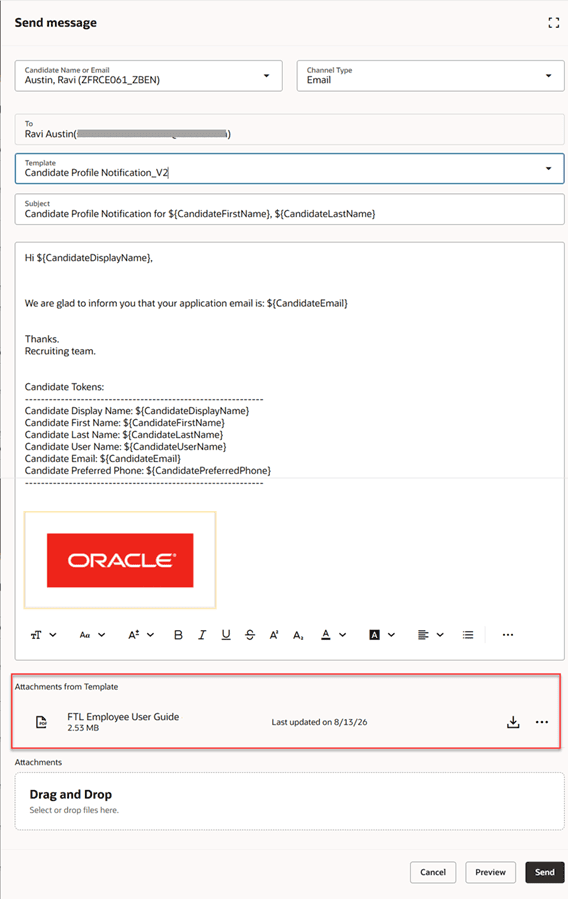
Recruiters can now include attachments tied to Recruiting Notification Library templates when sending emails through the Compose and Send Message actions — and those attachments carry through to automated notifications as well, if the template has them. When composing a message, recruiters can view, download, and preview the template’s attachments, add their own additional attachments, and remove a template attachment if they hold the necessary privilege.
This removes a manual step recruiters previously had to repeat for every message — attaching the same standard documents (like an offer packet or onboarding guide) by hand and by letting the notification template carry the attachments automatically.
Business benefits:
- Saves recruiter time by eliminating repetitive manual attachment uploads
- Ensures consistent, standardized communication across candidates
- Works across manual (Compose/Send Message) and automated notifications alike
- Gives recruiters flexibility to preview, download, or supplement attachments before sending